> ## Documentation Index
> Fetch the complete documentation index at: https://docs.protoface.com/llms.txt
> Use this file to discover all available pages before exploring further.

# Choosing a source image

> Pick a source image that helps Protoface build a natural custom avatar.

Use this page as the full reference for choosing an image for a custom avatar.
Protoface works best when the image has one clear, centered, front-facing
face-like subject. That subject can be a real person, an animated or generated
character, a mascot, or another synthetic character, as long as the face is
distinct and clear.

## What Protoface needs

A strong source image has:

* One primary subject only.
* A face or face-like structure looking directly at the camera.
* Both eyes visible.
* A distinct nose or nose bridge.
* A visible mouth, chin, cheeks, and forehead.
* Even lighting across the face.
* Enough room around the head so the face is not cut off.
* PNG or JPEG format.

For stylized, mascot, and synthetic avatars, the key is not realism. The key is
a clear face layout. The image is more likely to work when it has
familiar facial features: two eyes, a nose area, a mouth, a chin or jaw shape,
and a centered head.

## Good examples

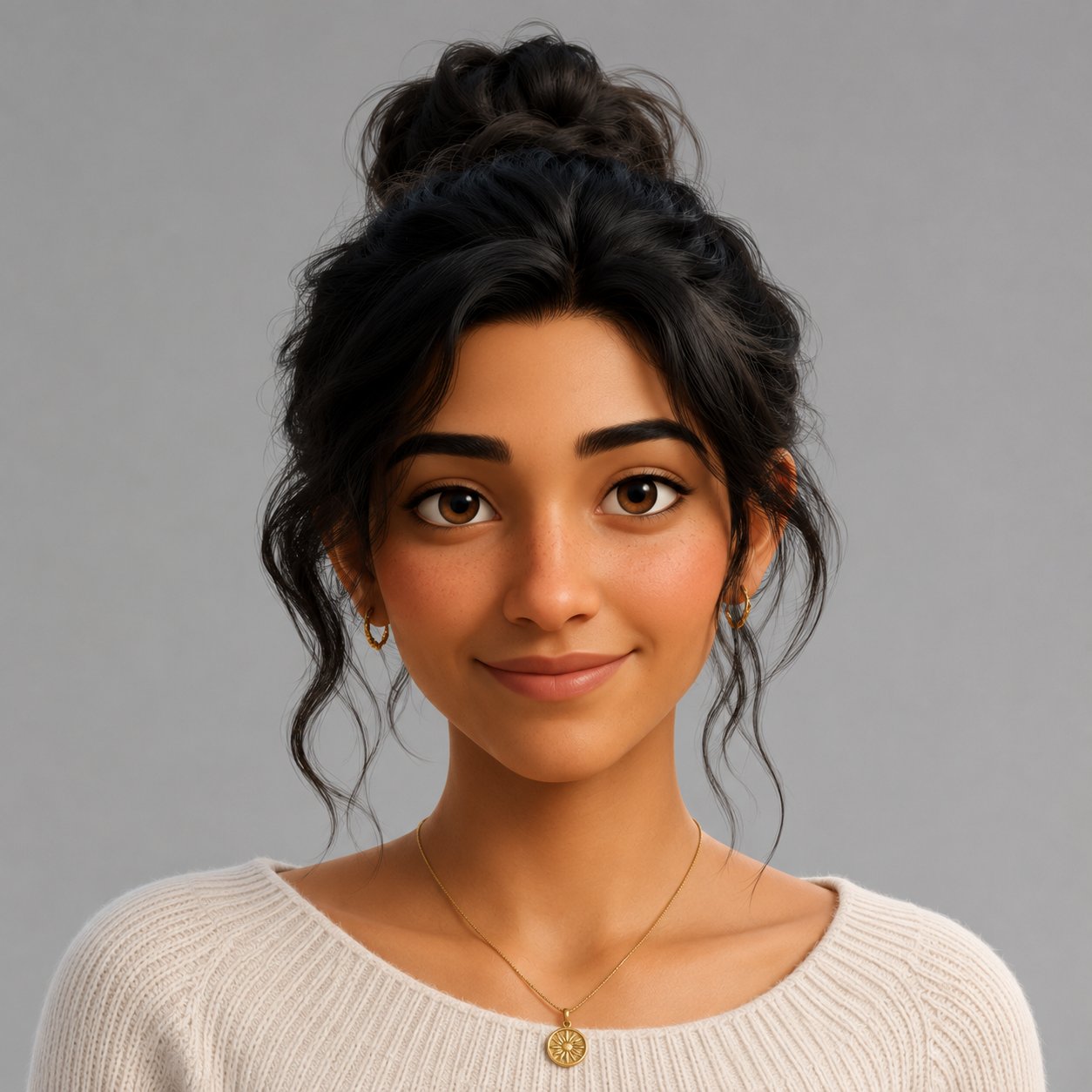
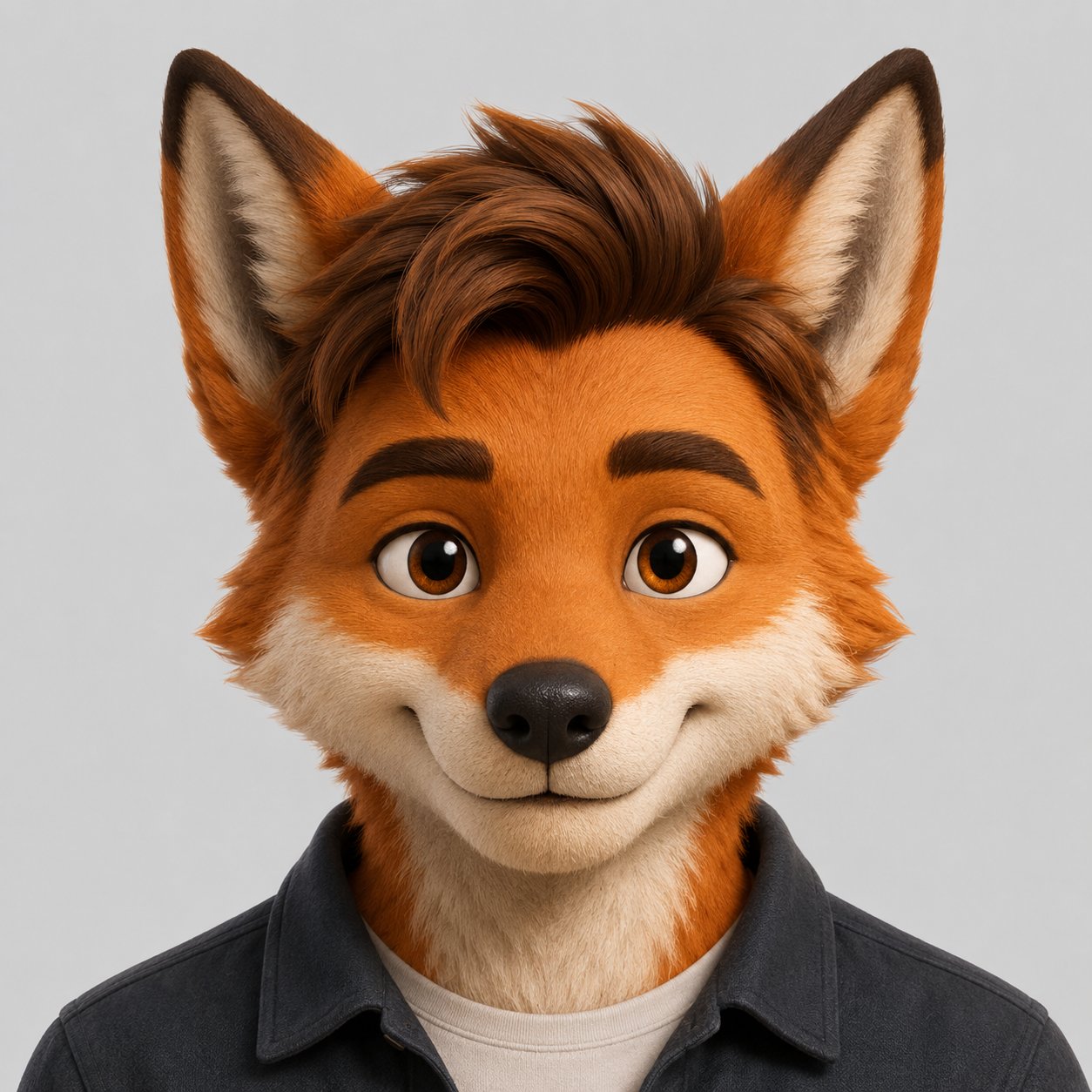
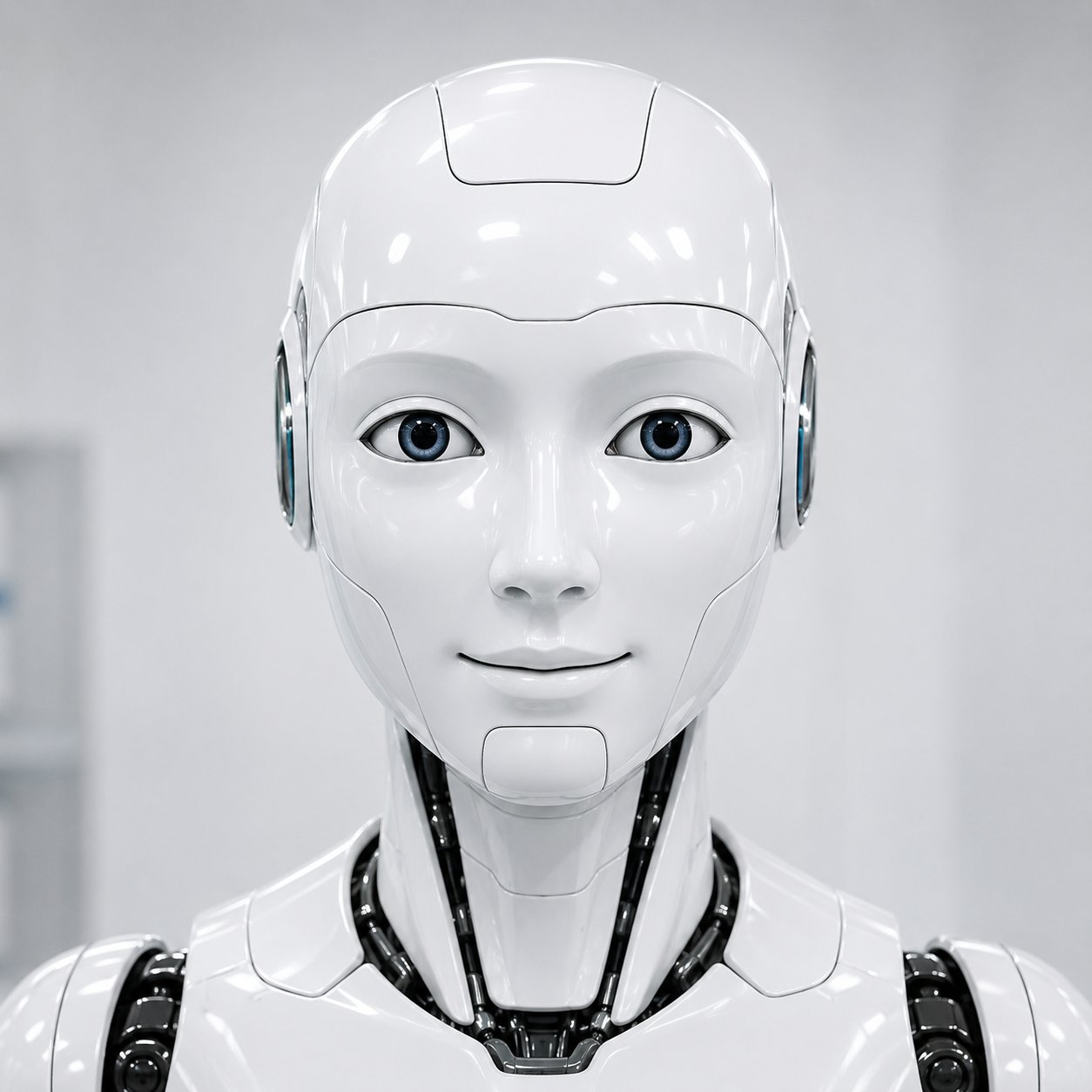
These images give Protoface a single distinct face with clear structure.

<Columns cols={2}>
  <Frame caption="Good: Distinct centered face">
    <div
      style={{
    aspectRatio: "1 / 1",
    border: "2px solid #16a34a",
    borderRadius: "12px",
    overflow: "hidden",
    position: "relative"
  }}
    >
      <div
        style={{
      background: "#16a34a",
      borderRadius: "999px",
      color: "white",
      fontSize: "12px",
      fontWeight: 700,
      left: "12px",
      padding: "4px 10px",
      position: "absolute",
      top: "12px",
      zIndex: 1
    }}
      >
        Good
      </div>

      <img src="https://mintcdn.com/protoface/VIFAz9jRrtLNHCR-/images/avatar-source-guide/good.webp?fit=max&auto=format&n=VIFAz9jRrtLNHCR-&q=85&s=5070d4d9c8bee7ce335f9d967818f970" alt="Good example: centered forward-facing real portrait with even lighting" style={{ display: "block", height: "100%", objectFit: "cover", width: "100%" }} width="875" height="700" data-path="images/avatar-source-guide/good.webp" />
    </div>
  </Frame>

  <Frame caption="Good: Distinct stylized face">
    <div
      style={{
    aspectRatio: "1 / 1",
    border: "2px solid #16a34a",
    borderRadius: "12px",
    overflow: "hidden",
    position: "relative"
  }}
    >
      <div
        style={{
      background: "#16a34a",
      borderRadius: "999px",
      color: "white",
      fontSize: "12px",
      fontWeight: 700,
      left: "12px",
      padding: "4px 10px",
      position: "absolute",
      top: "12px",
      zIndex: 1
    }}
      >
        Good
      </div>

      <img src="https://mintcdn.com/protoface/VIFAz9jRrtLNHCR-/images/avatar-source-guide/good-animated.png?fit=max&auto=format&n=VIFAz9jRrtLNHCR-&q=85&s=113702cc2da19b705a8c40d5518817eb" alt="Good example: centered forward-facing animated character with visible eyes, nose, mouth, chin, and forehead" style={{ display: "block", height: "100%", objectFit: "cover", width: "100%" }} width="1254" height="1254" data-path="images/avatar-source-guide/good-animated.png" />
    </div>
  </Frame>

  <Frame caption="Good: Clear face features">
    <div
      style={{
    aspectRatio: "1 / 1",
    border: "2px solid #16a34a",
    borderRadius: "12px",
    overflow: "hidden",
    position: "relative"
  }}
    >
      <div
        style={{
      background: "#16a34a",
      borderRadius: "999px",
      color: "white",
      fontSize: "12px",
      fontWeight: 700,
      left: "12px",
      padding: "4px 10px",
      position: "absolute",
      top: "12px",
      zIndex: 1
    }}
      >
        Good
      </div>

      <img src="https://mintcdn.com/protoface/VIFAz9jRrtLNHCR-/images/avatar-source-guide/good-animal.png?fit=max&auto=format&n=VIFAz9jRrtLNHCR-&q=85&s=b70fc3437bdca321e24951a6da0b6c97" alt="Good example: centered forward-facing mascot with a clear face-like structure" style={{ display: "block", height: "100%", objectFit: "cover", width: "100%" }} width="1254" height="1254" data-path="images/avatar-source-guide/good-animal.png" />
    </div>
  </Frame>

  <Frame caption="Good: Distinct synthetic face">
    <div
      style={{
    aspectRatio: "1 / 1",
    border: "2px solid #16a34a",
    borderRadius: "12px",
    overflow: "hidden",
    position: "relative"
  }}
    >
      <div
        style={{
      background: "#16a34a",
      borderRadius: "999px",
      color: "white",
      fontSize: "12px",
      fontWeight: 700,
      left: "12px",
      padding: "4px 10px",
      position: "absolute",
      top: "12px",
      zIndex: 1
    }}
      >
        Good
      </div>

      <img src="https://mintcdn.com/protoface/VIFAz9jRrtLNHCR-/images/avatar-source-guide/good-synthetic.png?fit=max&auto=format&n=VIFAz9jRrtLNHCR-&q=85&s=04ddc99532168ac4c83b7498d485affe" alt="Good example: centered forward-facing synthetic character with distinct eyes, nose, mouth, chin, and forehead" style={{ display: "block", height: "100%", objectFit: "cover", width: "100%" }} width="1254" height="1254" data-path="images/avatar-source-guide/good-synthetic.png" />
    </div>
  </Frame>
</Columns>

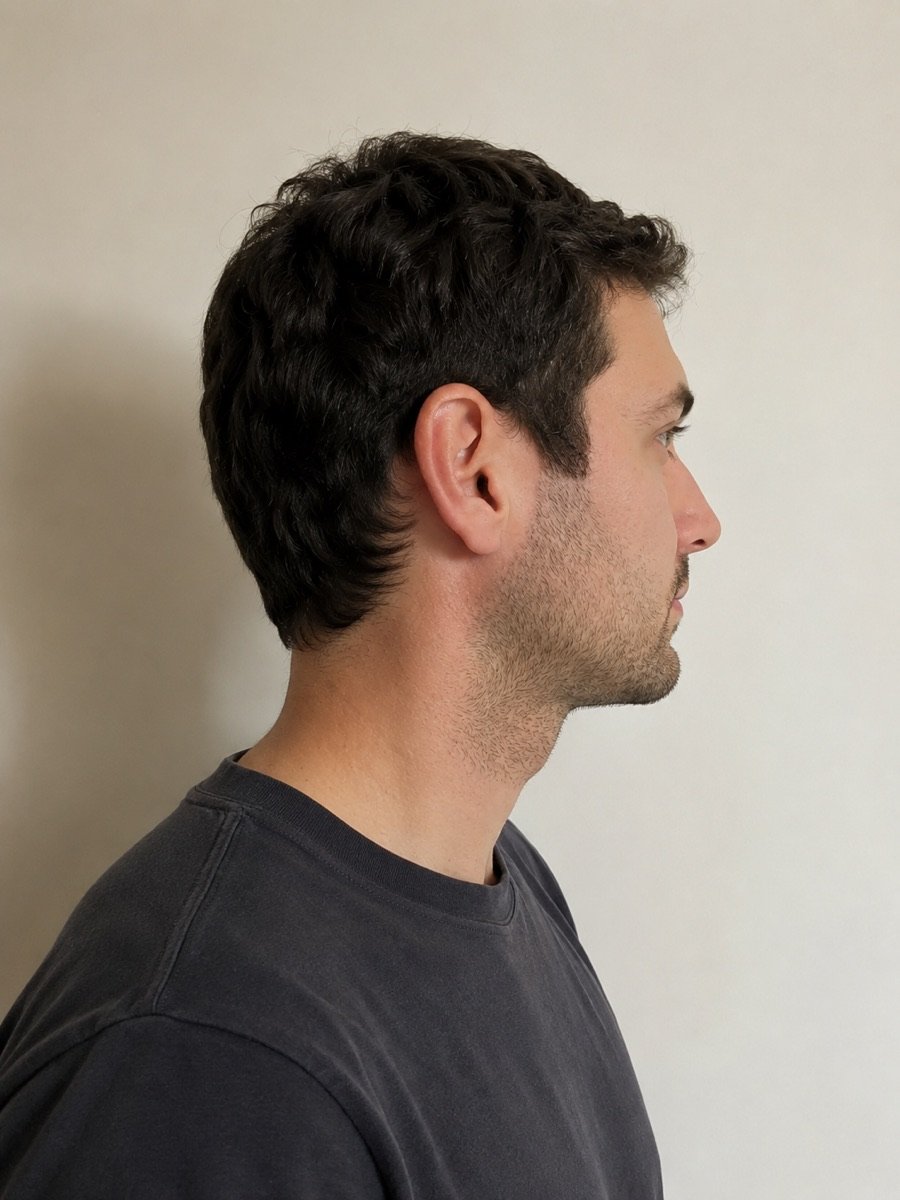
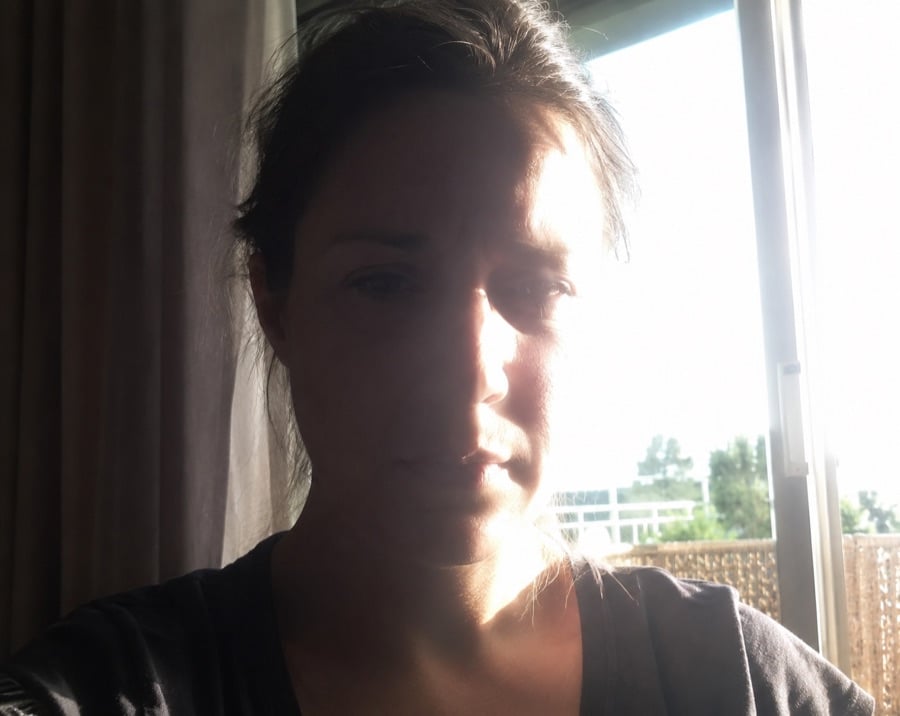
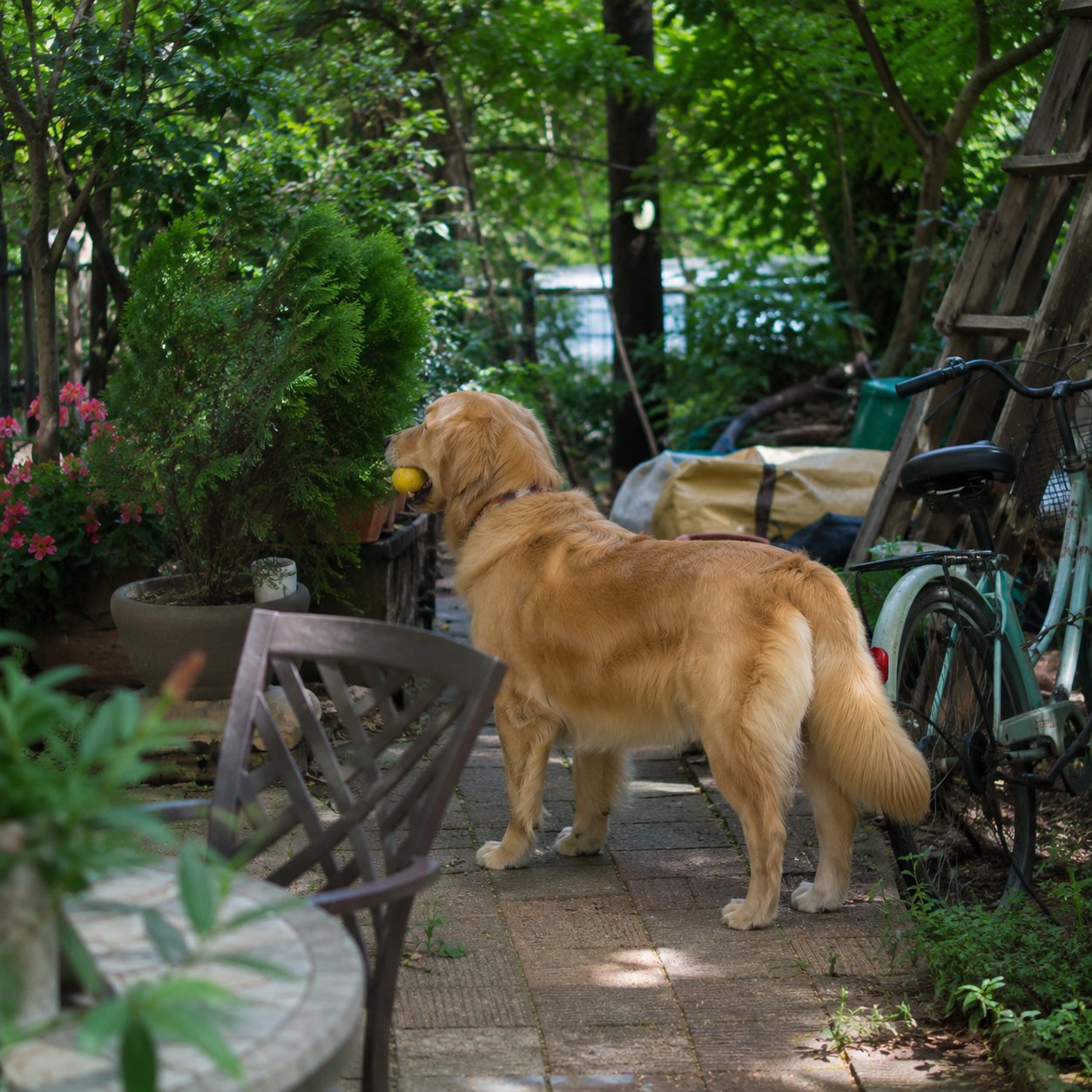
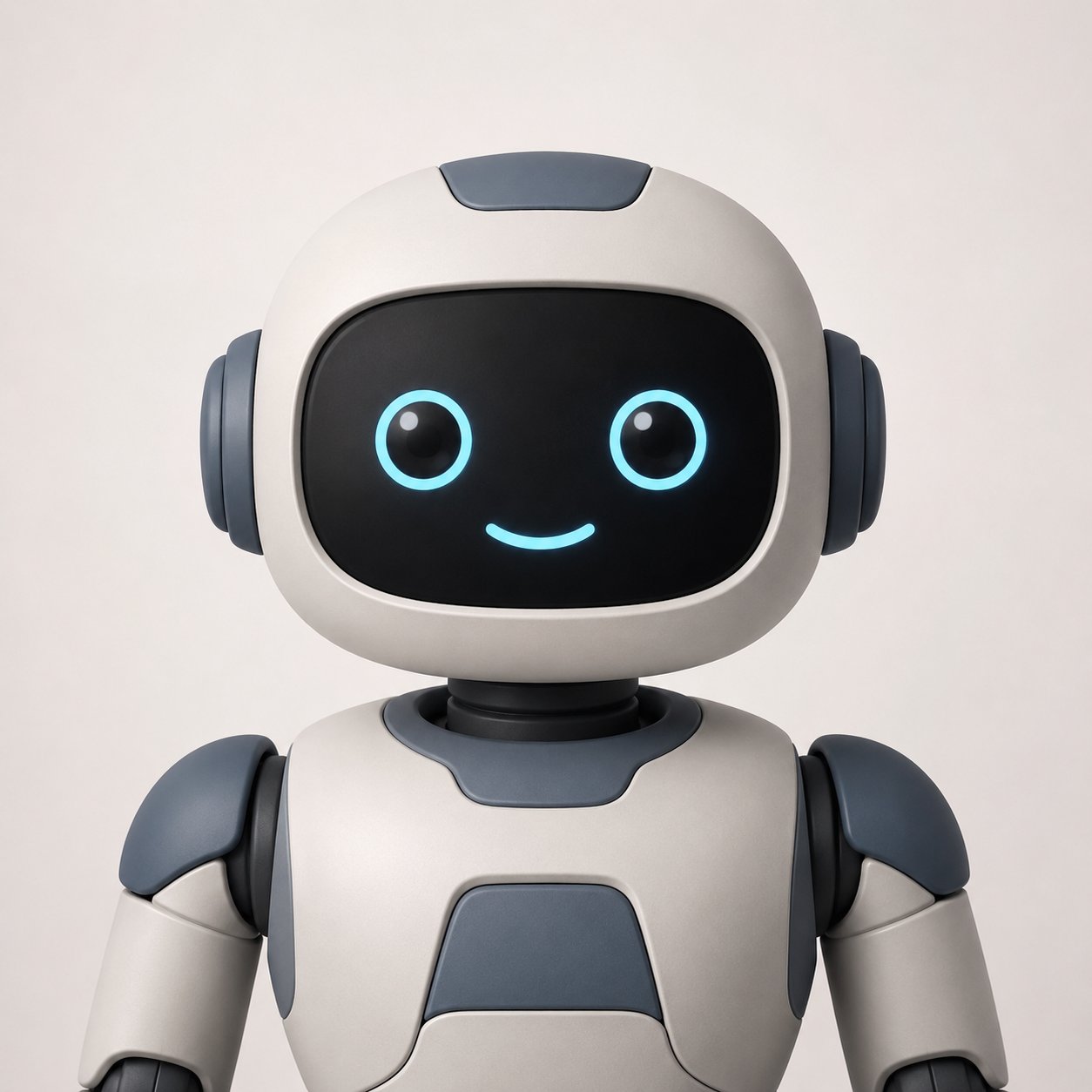
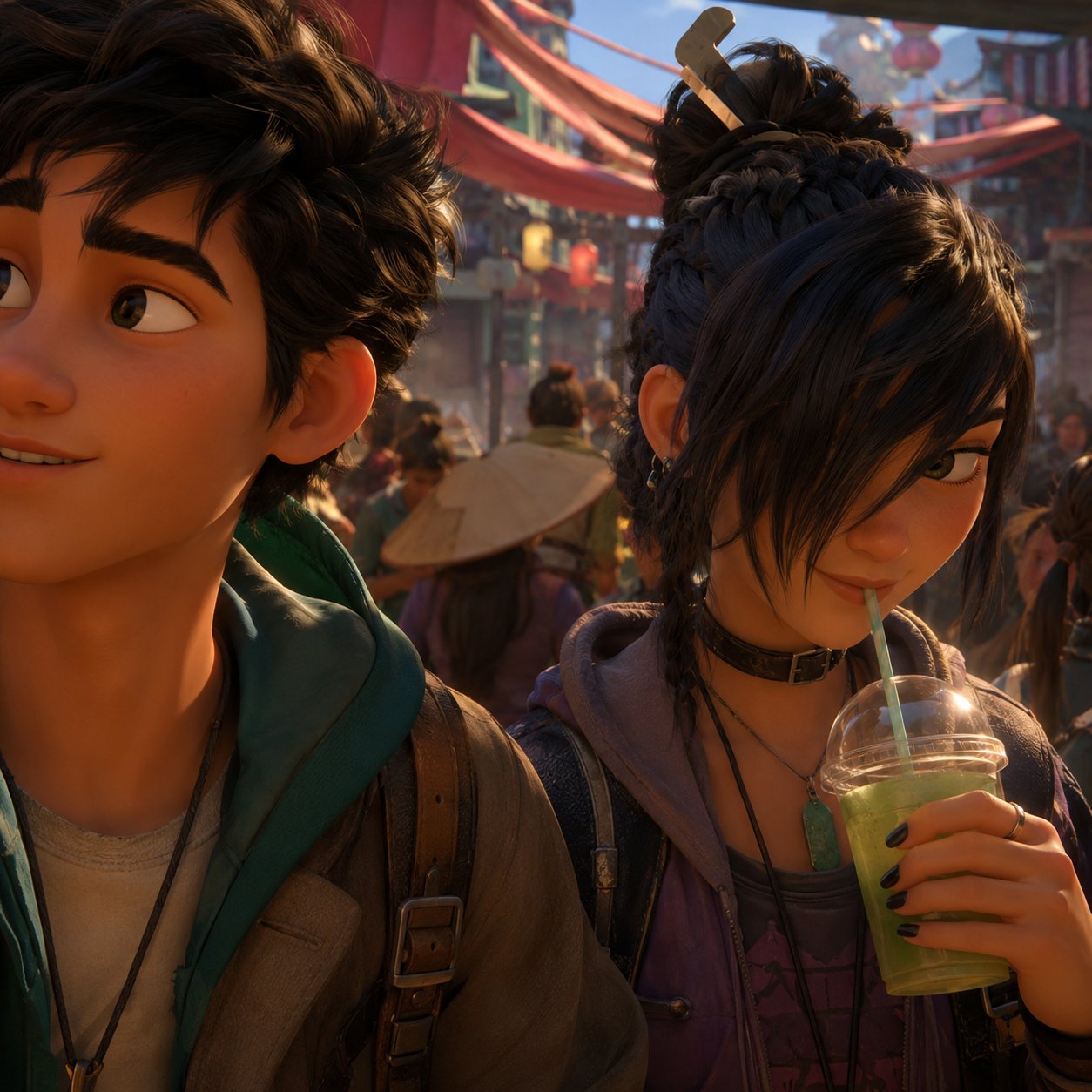
## Bad examples

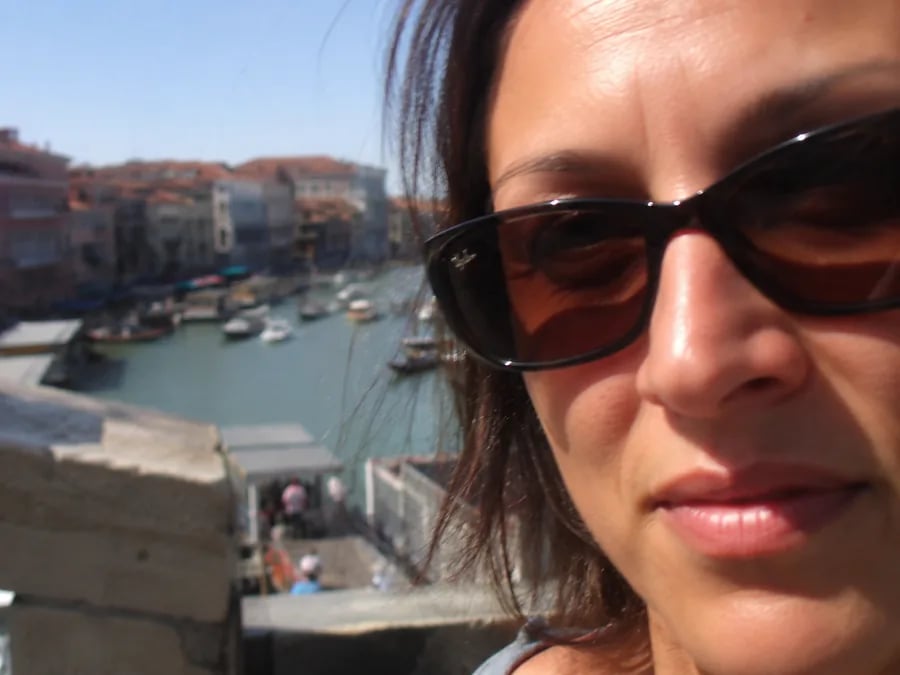
These images are harder for Protoface to detect correctly because the face is
cropped, turned away, poorly lit, too small, covered, or missing normal face
structure.

<Columns cols={2}>
  <Frame caption="Bad: Face cropped or covered">
    <div
      style={{
    aspectRatio: "1 / 1",
    border: "2px solid #dc2626",
    borderRadius: "12px",
    overflow: "hidden",
    position: "relative"
  }}
    >
      <div
        style={{
      background: "#dc2626",
      borderRadius: "999px",
      color: "white",
      fontSize: "12px",
      fontWeight: 700,
      left: "12px",
      padding: "4px 10px",
      position: "absolute",
      top: "12px",
      zIndex: 1
    }}
      >
        Avoid
      </div>

      <img src="https://mintcdn.com/protoface/VIFAz9jRrtLNHCR-/images/avatar-source-guide/bad-cropped.webp?fit=max&auto=format&n=VIFAz9jRrtLNHCR-&q=85&s=ba5e16f9942ed5b30b08fa439a63a36e" alt="Bad example: cropped portrait with the face partially obscured" style={{ display: "block", height: "100%", objectFit: "cover", width: "100%" }} width="900" height="675" data-path="images/avatar-source-guide/bad-cropped.webp" />
    </div>
  </Frame>

  <Frame caption="Bad: Face turned away">
    <div
      style={{
    aspectRatio: "1 / 1",
    border: "2px solid #dc2626",
    borderRadius: "12px",
    overflow: "hidden",
    position: "relative"
  }}
    >
      <div
        style={{
      background: "#dc2626",
      borderRadius: "999px",
      color: "white",
      fontSize: "12px",
      fontWeight: 700,
      left: "12px",
      padding: "4px 10px",
      position: "absolute",
      top: "12px",
      zIndex: 1
    }}
      >
        Avoid
      </div>

      <img src="https://mintcdn.com/protoface/VIFAz9jRrtLNHCR-/images/avatar-source-guide/bad-side-profile.jpg?fit=max&auto=format&n=VIFAz9jRrtLNHCR-&q=85&s=e88e9b46fca899b60f47123c77a8baf0" alt="Bad example: side-profile portrait where the face is turned away" style={{ display: "block", height: "100%", objectFit: "cover", width: "100%" }} width="900" height="1200" data-path="images/avatar-source-guide/bad-side-profile.jpg" />
    </div>
  </Frame>

  <Frame caption="Bad: Face in shadow">
    <div
      style={{
    aspectRatio: "1 / 1",
    border: "2px solid #dc2626",
    borderRadius: "12px",
    overflow: "hidden",
    position: "relative"
  }}
    >
      <div
        style={{
      background: "#dc2626",
      borderRadius: "999px",
      color: "white",
      fontSize: "12px",
      fontWeight: 700,
      left: "12px",
      padding: "4px 10px",
      position: "absolute",
      top: "12px",
      zIndex: 1
    }}
      >
        Avoid
      </div>

      <img src="https://mintcdn.com/protoface/VIFAz9jRrtLNHCR-/images/avatar-source-guide/bad-harsh-lighting.jpg?fit=max&auto=format&n=VIFAz9jRrtLNHCR-&q=85&s=0de1af6bb96847b6586691ccc55cb1c5" alt="Bad example: portrait with harsh backlighting and deep face shadows" style={{ display: "block", height: "100%", objectFit: "cover", width: "100%" }} width="900" height="716" data-path="images/avatar-source-guide/bad-harsh-lighting.jpg" />
    </div>
  </Frame>

  <Frame caption="Bad: No distinct face">
    <div
      style={{
    aspectRatio: "1 / 1",
    border: "2px solid #dc2626",
    borderRadius: "12px",
    overflow: "hidden",
    position: "relative"
  }}
    >
      <div
        style={{
      background: "#dc2626",
      borderRadius: "999px",
      color: "white",
      fontSize: "12px",
      fontWeight: 700,
      left: "12px",
      padding: "4px 10px",
      position: "absolute",
      top: "12px",
      zIndex: 1
    }}
      >
        Avoid
      </div>

      <img src="https://mintcdn.com/protoface/VIFAz9jRrtLNHCR-/images/avatar-source-guide/bad-animal-full-body.png?fit=max&auto=format&n=VIFAz9jRrtLNHCR-&q=85&s=051725f8af0e5aa76a00f8d1beab25c8" alt="Bad example: full-body animal side view with no distinct front-facing face" style={{ display: "block", height: "100%", objectFit: "cover", width: "100%" }} width="1254" height="1254" data-path="images/avatar-source-guide/bad-animal-full-body.png" />
    </div>
  </Frame>

  <Frame caption="Bad: Missing face features">
    <div
      style={{
    aspectRatio: "1 / 1",
    border: "2px solid #dc2626",
    borderRadius: "12px",
    overflow: "hidden",
    position: "relative"
  }}
    >
      <div
        style={{
      background: "#dc2626",
      borderRadius: "999px",
      color: "white",
      fontSize: "12px",
      fontWeight: 700,
      left: "12px",
      padding: "4px 10px",
      position: "absolute",
      top: "12px",
      zIndex: 1
    }}
      >
        Avoid
      </div>

      <img src="https://mintcdn.com/protoface/VIFAz9jRrtLNHCR-/images/avatar-source-guide/bad-screen-face.png?fit=max&auto=format&n=VIFAz9jRrtLNHCR-&q=85&s=30253830aa0e234f9df4be1d2a91a75c" alt="Bad example: synthetic character with a screen face and no distinct nose, mouth, chin, or forehead" style={{ display: "block", height: "100%", objectFit: "cover", width: "100%" }} width="1254" height="1254" data-path="images/avatar-source-guide/bad-screen-face.png" />
    </div>
  </Frame>

  <Frame caption="Bad: Multiple unclear faces">
    <div
      style={{
    aspectRatio: "1 / 1",
    border: "2px solid #dc2626",
    borderRadius: "12px",
    overflow: "hidden",
    position: "relative"
  }}
    >
      <div
        style={{
      background: "#dc2626",
      borderRadius: "999px",
      color: "white",
      fontSize: "12px",
      fontWeight: 700,
      left: "12px",
      padding: "4px 10px",
      position: "absolute",
      top: "12px",
      zIndex: 1
    }}
      >
        Avoid
      </div>

      <img src="https://mintcdn.com/protoface/VIFAz9jRrtLNHCR-/images/avatar-source-guide/bad-animated-multiple.png?fit=max&auto=format&n=VIFAz9jRrtLNHCR-&q=85&s=1d23754c566a5c021b1d83a7ef89ccaa" alt="Bad example: animated image with multiple faces, cropped faces, and covered facial features" style={{ display: "block", height: "100%", objectFit: "cover", width: "100%" }} width="1254" height="1254" data-path="images/avatar-source-guide/bad-animated-multiple.png" />
    </div>
  </Frame>
</Columns>

## Best practices by image type

### Real people

Use a head-and-shoulders portrait with the person centered and looking forward.
The eyes, nose, mouth, chin, and forehead should all be visible. A neutral or
slightly smiling expression is best. Avoid sunglasses, masks, hands on the face,
heavy hair over the eyes, strong backlight, motion blur, and tight crops.

### Animated or generated characters

Animated and AI-generated characters can work well when they are composed like a
portrait photo. Use one character, front-facing, centered, with clear eyes, nose,
mouth, chin, forehead, and symmetrical head shape. Avoid action scenes, crowd
shots, partial faces, dramatic camera angles, and props covering the face.

### Animal or mascot characters

Animal and mascot avatars work best when the image is a human-like mascot
portrait, not a normal pet photo. Use a front-facing character with large
visible eyes, a centered snout or nose, a clear mouth, cheeks, chin or jaw
shape, and a head-and-shoulders crop. Avoid full-body animals, side views, tiny
faces, busy outdoor backgrounds, or real pets holding toys in their mouth.

### Synthetic characters

Synthetic characters work best when they have a human-like or mascot-like face
layout. Use a character with two visible eyes, a nose bridge or nose-like shape,
a mouth, chin, forehead, and symmetrical head. Avoid screen-only faces, black
visors, helmets with no visible facial structure, reflective masks, or abstract
heads.

## Quick checklist before upload

Use an image where:

* The subject is the only face in frame.
* The face is large enough to inspect clearly.
* The subject is looking forward, not sideways or downward.
* Both eyes are visible.
* The nose, mouth, chin, cheeks, and forehead are visible.
* The lighting is even.
* The source image has no UI, stickers, text, or watermark.
* The file is PNG or JPEG.

Avoid images with:

* Multiple faces.
* Side profiles or tilted heads.
* Full-body subjects with tiny faces.
* Sunglasses, masks, hair, hands, props, or objects covering the face.
* Harsh backlighting, deep shadows, blur, filters, or heavy stylization.
* Abstract, screen-only, or helmet-like faces without normal features.
* Cropped-off foreheads, chins, ears, or cheeks.

## If a build fails

If an avatar reaches `status: "failed"`, check `failure_reason` on the avatar
response before uploading another source image. If the reason says no face was
detected, choose a clearer front-facing source with stronger face features.

For stylized characters, mascots, and synthetic characters, try making the next
image more portrait-like with familiar facial features. Add visible eyes, nose
area, mouth, chin, and forehead, then remove anything that hides or competes
with the face.

## Next

<Columns cols={2}>
  <Card title="Create an avatar" href="/guides/avatars#create-an-avatar" icon="user-round-plus">
    Upload a portrait image from the dashboard or API.
  </Card>

  <Card title="Create a custom avatar from an image" href="/api-reference/avatars/create-a-custom-avatar-from-an-image" icon="file-up">
    See the upload endpoint and request shape.
  </Card>
</Columns>